2G and 3G has switched off
If your phone/device relies on 2G or 3G, you will need to replace it.
Your phone may already be using 4G/5G for calling or data, but to ensure full 4G/5G connectivity, please follow the instructions below.
We have reached out to our impacted customers based on our records (which may not always be perfect!), but it is highly recommend that you free TXT ‘3G’ to 550 from your phone to triple check your phone or device status.
Note: If you make voice calls over our 2G and 3G networks, you will hear a short message about the network shutdown before your call connects. You may hear this even if your phone usually makes successful calls on our 4G/5G networks. For more information, read our 3G FAQs below.
Important things to know
What can I do now?
There are easy ways to check how your phone is impacted by the shutdown and what you need to do.
Start by TXTing 3G to 550.

Start here: Free TXT 3G to 550
- TXT 3G to 550 from your phone and you will receive a TXT reply on how your phone is affected and what you need to do to be ready (if anything!).
- Using this SMS service is optional. Please note that if you do not have a compatible phone or cannot TXT, you will not be able to use it and you will need an approved phone.
- If you’re unsure about what your responses mean and to understand how we will use your number when you TXT the SMS checker, check out the FAQs below.

Update your phone settings
- Download and install the latest phone software updates.
- Enable 4G/5G and VoLTE/4G-calling capabilities in your mobile settings (if possible, a software update usually does the trick on late model phones).
- Check if your phone can make 4G or 5G calls (known as VoLTE) with this VoLTE phones list.
- Restart your phone once you’ve completed the above.
- If unsure, visit our stores, call us or check the online guide.
Tip: Turning on WiFi Calling may help. This will allow you to make a voice call over WiFi wherever you can get a WiFi connection. Learn how to enable this here.

Upgrade your phone is needed
But don't stress, since there are plenty of eligible phones that you can consider.
What if 3G has shutdown in my area and I’m having calling issues?
Make sure you’ve had a look at the instructions in “What can I do now?” - a change of a some phone settings might do the trick.
If you need help with checking or need a new phone please get in touch with us however you can:
- Visit a One NZ Retail Store
- Call us (doesn’t need to be from your mobile phone):
- Personal: 0800 777 049
- Business: 0800 777 032
- Message us
- Experiencing coverage issues? Drop a pin with us.
Stay safe from 3G scams
Scammers may call, text, or email pretending to be from One NZ and say you need to pay a fee, download an app, or share personal details to keep your service running.One NZ will never call you directly to make a payment over the phone. If something doesn’t feel right, don’t click on links and hang up straight away. Contact us directly and we’ll be happy to help.
How to update your phone settings
Watch the video for step by step instructions on updating your phone, whether you use an iPhone or Android if you prefer, you can also follow the detailed written steps below
Watch video Check out the detailed steps
How to update your iPhone settings
To check that 4G/5G data and voice calling (VoLTE) is enabled on your phone please follow these steps.
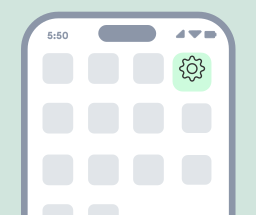
1. Go to settings
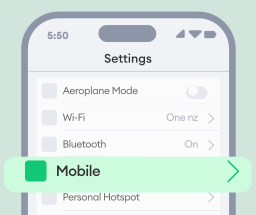
2. Go to Mobile

3. Go to Mobile Data Options
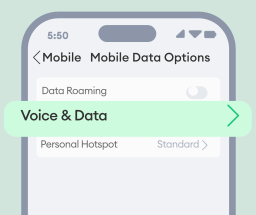
4. Go to Voice & Data
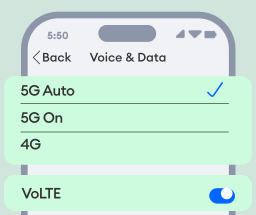
5. Ensure 4G or 5G is enabled
Make sure “VoLTE” is on. Note: iPhone 12 and above models will not have a VoLTE toggle.
Please restart your phone, once you’ve completed the above steps.
How to update your Android phone settings
Alcatel 30.82 Flip Phone - update phone software:
1. Select Menu>Settings
2. Scroll down to the end and click on Update>Check for updates
3. The phone will then check for updates. If an update is available, press 'Download'.
4. Once the software has downloaded, press 'Install' and 'Agree'.
5. When you've completed this, please repeat the above steps until you see software version "010 08".
To check that 4G/5G data and voice calling (VoLTE) is enabled on your phone please follow these steps. Note: these are general directions, specific menu and settings name will vary across Android phone brands and models.
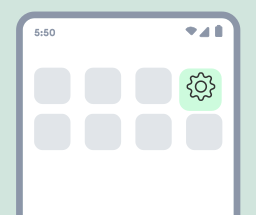
1. Go to Settings
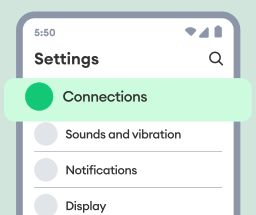
2. Go to Connections

3. Go to Mobile Networks
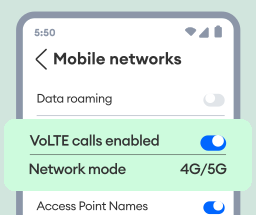
4. Ensure 4G/5G and VoLTE are enabled
Make sure 4G/5G Network mode is selected.
Please restart your phone, once you’ve completed the above steps.
Xiaomi phones
1. Open the Phone app (where you dial phone numbers)
2. Dial *#*#86583#*#* to prompt a message that says “VoLTE carrier check disabled”.
3. Go to Settings > SIM cards & mobile networks > Select your active One NZ SIM
4. Scroll down to toggle ON “Use VoLTE” (if not already enabled).
5. Restart your phone.
Upgrade to a great value phone
Check out some of our best phone deals that you can buy outright or interest-free. Not the right phone? Take a look at our full range of phones or even interest-free phone deals.

PrePay phone deals


One Wallet

Recycle your old phones
Read in your language
View 3G shutdown information in your language
•简体中文 - 3G shutdown factsheet (Chinese Simplified)
•繁体中文- 3G shutdown factsheet (Chinese Traditional)
•English - 3G shutdown factsheet
•日本語 - 3G shutdown factsheet (Japanese)
•한국어 - 3G shutdown factsheet (Korean)
•Te reo Māori - 3G shutdown factsheet (Māori)
•Gagana Samoa - 3G shutdown factsheet (Samoan)
•Español - 3G shutdown factsheet (Spanish)
•Lea Fakatonga - 3G shutdown factsheet (Tongan)
2G data and 3G shutdown schedule

For a detailed view of the 3G shutdown regions, see our live coverage map.
| Start date of 2G data and 3G network shutdown | Indicative area (not absolute to regional boundaries) | Current progress | |
| 1 | 20th January | Dunedin | Completed |
| 28th January | Rural Connectivity Group (RCG) sites. Located across the country in various areas. | Completed | |
| 2 | 3rd February | Southland and Otago | Completed |
| 3 | 10th February | Canterbury, West Coast, Tasman & Marlborough (rest of South Island) excl Christchurch | Completed |
| 4 | 17th February | Northland | Completed |
| 5 | 24th February | Waikato, Bay of Plenty, Gisborne, Hawke’s Bay, Taranaki & Wanganui (Rest of North Island) excl Auckland and Wellington | Completed |
| 6 | 3rd March | Christchurch | Completed |
| 7 | 10th March | 2G data & 3G: Auckland, Kaipara Harbour (Southern) and Dargaville 2G calling: Dunedin, Southland and Otago (Region 1&2) | Completed |
| 8 | 23rd March | 2G data & 3G: Wellington 2G calling network: Nation-wide (NZ) | Completed |
Commonly asked questions
Network and coverage
Why are you shutting down the 3G network?
Did you know that our company launched New Zealand's first 3G GSM network way back in August 2005.
With a limited number of radio frequencies available to us, like other mobile network providers around the world, we're reallocating this resource toward the 5G network rollout and expanding our 5G coverage for more New Zealanders.
To see if 4G or 5G are already available in your area, simply use our network coverage map .
When was the 3G network switched off?
Why am I hearing a message about the 3G network shutdown when I make a call?
If you bought your phone from overseas or from a parallel importer, we can’t guarantee that your phone will be able to make 111 emergency calls after 2G and 3G are completely switched off. You may still be able to make standard voice calls
To ensure your phone is working correctly and to find out how to stay connected, please free TXT '3G' to 550."
What happens if I haven’t upgraded my mobile phone and the network has already shut down?
Prepay mobile plan customers
You will have received TXT messages from us letting you know that we had moved you to a PrePay Pay & Go . This enables you to upgrade to an approved phone and means:
- No unnecessary charges: You won't be billed for a plan you can't properly use.
- Safe keeping: We will hold onto your mobile phone number and existing Prepay balance until you upgrade to an approved phone and top up within 360 days to reactivate your mobile services. After 360 days, your mobile phone number may be reallocated to another user.
- Mobile services paused: During this time (360 days), you won't be able to use One NZ services or your existing balance until you have upgraded to an approved phone.
How to reactivate your One NZ mobile services:
- You must take action ASAP.
- Simply upgrade to any One NZ approved phone and top up within 360 days.
- Once you do, you can either top up and remain on the existing Prepay plan, change to another Prepay mobile plan or switch over to a Pay Monthly mobile plan of your choice to start using your mobile phone number, mobile services and balance again.
Pay Monthly mobile plan customers
If you have a phone that won’t work properly after the 3G network has shut down, and won’t support full use of our mobile services, you will have received TXT messages from us letting you know that we will credit billing on your mobile plan for 2 months. If no action is taken during this 2-month period, you will be moved to a Prepay Pay & Go mobile plan. This means:
- No unnecessary charges: We will credit billing for 2 months.
- Time to make changes: You will have 2 months to upgrade your phone if you want to continue to use One NZ services. If you haven’t upgraded your phone within 2 months, you will be moved to a Prepay Pay & Go mobile plan.
- Safe keeping: We will hold onto your phone number until you take action to reactivate your mobile services within 2 months. After this your mobile phone number may be reallocated to another user.
- Mobile services paused: You won't be able to use One NZ mobile services or your existing balance until you have upgraded to an approved phone.
How to reactivate your One NZ mobile services:
- You must take action within 2 months.
- Simply upgrade to any One NZ approved phone within 2 months. Once you do, you will remain on your existing mobile plan.
- If you don't take action within 2 months, you will be moved to a Prepay Pay & Go plan. You will still need to upgrade to a One NZ approved phone and top up within 360 days to reactivate your mobile services under this plan.
- If you don’t take action within 2 months, your mobile phone number may be reallocated, your services will be disconnected and any remaining credit balance will be lost.
- If you haven’t purchased your phone directly from One NZ, we can’t guarantee it will be able to make 111 emergency calls. To ensure your phone is fully compatible with our 4G/5G network, please check that your phone is on our 4G capable (VoLTE) list here.
- See full mobile terms.
What services are affected with the 3G switch off?
Most 4G/5G phones will work fine but there are a couple of things to bear in mind:
- You may need to ensure you have downloaded and installed the latest phone updates and then enabled 4G/5G data and 4G/5G voice calling (also called “VoLTE” in your phone settings).
- Some older 4G phones may not work for 4G/VoLTE voice calling although 4G data and text/SMS will probably continue to work. Again, ensure you have downloaded and installed the latest phone updates and then enabled 4G/5G data and 4G/5G voice calling (also called “VoLTE” in your phone settings).
- Please look at our phone instructions on this page.
Some wireless modems for wireless and rural broadband will be impacted and we will contact you directly to outline your options here.
What should I do if I can't connect to the 4G network in my area?
What is the rural 3G network?
Any One NZ customer who is using this rural 3G network for mobile voice calling or data in an RCG area, will no longer be able to do so. Any 111 emergency calls made by a One NZ customer will use Spark NZ’s 3G network until the end of March 2026 (when their 3G network will be shut down). 2degrees switched off their RCG 3G late 2025.
What is WiFi Calling and can it help me?
Visit this page to learn more and see if your phone supports this feature.
Will my phone work for the One NZ Satellite service?
Phones purchased outside of New Zealand (including parallel imports) may not be compatible.
Our list of eligible phones will be updated as more phones complete testing, however it is likely that older 4G phones that don’t support 4G/5G voice calling (VoLTE) and VoLTE roaming will also not work on the One NZ Satellite TXT service – another reason we recommend upgrading to a compatible phone.
See full list of One NZ Satellite compatible phones here.
What about IoT (Internet of Things) devices and what are these?
In simple terms, IoT allows everyday objects to "talk" to each other and to us, helping automate tasks, improve efficiency, and provide useful insights. For example, a smart fridge can track food expiry dates, or a GPS tracker in a vehicle can help businesses monitor deliveries in real time.
Internet of Things Examples
You likely use IoT devices every day. The list below outlines a few examples of IoT in action across our everyday lives and industries:
1. Health Monitoring & Medical Devices
- Smartwatches & Fitness Trackers (e.g., Apple Watch, Fitbit) – Monitor heart rate, sleep, and activity, alerting users to potential health issues.
- Remote Patient Monitoring (RPM) – Devices track blood pressure, glucose levels, or heart rhythms and send real-time data to doctors for early intervention.
2. Smart Homes
- Smart Thermostats – Learn your schedule and adjust temperature to save energy.
- Security Cameras & Doorbells (e.g., Ring, Arlo) – Allow homeowners to monitor and communicate with visitors remotely.
- Smart Appliances – Fridges that track food expiry or washing machines that notify you when a cycle is done.
3. Smart Buildings
- Automated Lighting & HVAC – Sensors adjust lighting and temperature based on occupancy to save energy.
- Leak & Air Quality Sensors – Detect leaks, smoke, or poor air quality to improve safety and reduce maintenance costs.
4. Smart Construction
- IoT Enabled Equipment Monitoring – Sensors on heavy machinery track usage, predict maintenance needs, and reduce downtime.
- Wearable Safety Gear – Smart helmets and vests monitor workers' location and detect falls or fatigue to enhance safety.
- Smart Concrete Sensors – Measure temperature and moisture levels to optimise curing and improve building quality.
5. Lone Worker Safety
- Wearable Panic Buttons – Employees in remote areas can send emergency alerts with GPS location if they need help.
- Fall Detection Devices – Smart sensors detect sudden falls and automatically trigger an alert for assistance.
6. Connected Vehicles & Logistics
- Fleet Tracking – GPS and sensors help businesses monitor trucks, optimise routes, and reduce fuel costs.
- Smart Cars – Some vehicles diagnose mechanical issues and alert the driver or even call emergency services in an accident.
7. Smart Cities & Infrastructure
- Traffic Management – Sensors in roads and traffic lights help reduce congestion.
- Smart Streetlights – Adjust brightness based on movement to save energy.
8. Agriculture & Farming
- Soil Sensors – Monitor moisture levels and optimize irrigation.
- Smart Livestock Tags – Track animal health and location, reducing losses.
Mobile phones and devices
Will my phone still work?
Most 4G phones and 5G phones will work fine but there are a couple of things to bear in mind:
- You may need to download and install the latest phone OS updates and then enable 4G/5G data and 4G/5G voice calling (also called “VoLTE” in your phone settings).
- Some older 4G phones may not work for 4G/VoLTE voice calling although 4G data and text/SMS will probably continue to work. Again - ensure you have downloaded and installed the latest phone updates and then enabled 4G/5G data and 4G/5G voice calling (also called “VoLTE” in your phone settings).
iPhone 6 was the first to use 4G for voice calls. So any iPhone model newer than iPhone 6 will work with our 4G network for calling.
Beyond that, iPhone 12 was the first iPhone model to be 5G-capable.
For Android phones, the Samsung Galaxy S4 was the first S Series phone to use 4G, meaning the Galaxy S4 and newer phones are 4G capable.
Tablets and iPad models can work on our mobile network of course. It was the 3rd generation iPad with cellular that first came with support for 4G, and that launched in early 2012.
How do I check if my device is 4G or 5G VoLTE capable?
A list of 4G and 5G VoLTE capable phones is available here so you can check if your phone supports VoLTE. If you’re still unsure, pop into a One NZ store , and the team will check for you.
If you’re unsure what model your phone is, you’ll find this information in your phone’s settings.
Will I need a new SIM card?
If your phone is fully 4G/5G compatible then you won’t need to change your SIM card. If you need to upgrade your phone, then it is possible that your new phone will require a smaller SIM card, which you may need to visit a One NZ retail store to get your connection switched over to this new SIM card. You can still keep your existing phone number. Find out more about swapping your SIM here .
My phone isn’t connecting to 4G. What should I do?
- First, check if your phone is 4G-capable. See our list of 4G VoLTE capable phones and 5G-capable phones .
- Ensure your phone’s software is up to date and the VoLTE service has been enabled in your device settings. If needed, you can access instructions for enabling VoLTE .
- Update your device settings to connect to 4G using these user guides .
- Check you're in an area with 4G coverage using our network coverage map .
Having issues connecting to 4G?
Contact us
I need to upgrade my mobile phone but don’t want an expensive one. What can I do?
To find the best option for you, talk to one of our mobile experts or visit us in-store .
What if I have other devices that aren’t mobile phones?
- Tablets, iPads and laptops.
- Watches and other wearables.
- Home monitoring including doorbells and cameras.
- Farm gates and other equipment.
- Motor vehicle tracking.
If you have put a SIM card into any of these types of devices to connect them using our mobile network, you’ll need to check them to make sure they will continue to work after we shutdown our 3G and 2G networks.
I am using a mobile repeater(s) or signal booster(s) to boost mobile network coverage that I have purchased direct from suppliers. How will this be impacted?
There isn't a way for us to identify who and where these repeaters are being used as these devices simply amplify our mobile network radio signal and do not connect directly to our network like devices with SIM cards do.
Please ensure that you check any repeater devices and contact the supplier to confirm whether it will be impacted by the network shutdown. If replacing your repeater/booster, please note that some suppliers claim their repeaters work effectively in New Zealand but they don’t and can cause interference to mobile networks. It’s important to check that the devices support our 4G frequency bands such as the CEL-FI Go booster devices available in NZ.
If you sourced a repeater via Vodafone NZ or One NZ then you should already have been contacted by us if it needs to be replaced with a new solution. If you have not been contacted, please get in touch with your Account Manager or Service Delivery Manager directly.
What is VoLTE?
Will my Wireless Modem or Homephone Wireless device be affected?
- 3G only data modems with or without landline calling.
- 4G data modems that use 3G for landline calling (if they are only used for data then no changes are required).
- Homephone Wireless 3G devices used for landline calling.
Don’t worry if you have one of these devices, we will be contacting you soon to let you know exactly what will happen.
Free TXT 3G to 550
How will my phone number be used when I message the SMS checker?
What do my responses mean?
You will need to upgrade to an approved phone
If you received one of these messages, your phone is not compatible once 3G shuts down. Please visit a One NZ store to explore your upgrade options – we’re here to help!
| Message | What it means |
Your phone is only able to connect through 2G or 3G so you’ll need to upgrade to a new phone soon. | Your phone does not have any 4G capabilities. |
| Your phone may work for 4G data but it won’t be able to make 4G voice calls (including emergency calls). | Your phone does not support 4G calling. |
You should upgrade to an approved phone for the best possible coverage.
If you received any of these messages, your phone doesn’t have the technology to receive the best 4G/5G coverage possible.
| Message | What it means |
| Your phone won’t get the best 4G/5G coverage in rural areas or inside large buildings. | This means you may experience poorer coverage when inside large buildings or in rural areas - you may already experience dropped calls. An approved phone upgrade would fix this. |
You need to update your phone settings
If you received one of these messages, your phone may work – but you’ll need to update your phone’s software and enable 4G/5G data and calling (VoLTE). See top of this page for how-to steps.
| Message | What it means |
| Your phone isn’t tested by One NZ. | This means you have a phone model that isn’t tested for 4G/5G calling. |
| Your phone isn’t using 4G/5G for voice calls right now. | Due to your phone’s default setting. |
| Your phone is making 4G/5G calls, but not guaranteed for emergency calls. | As it’s not a phone model that we have tested, we can’t guarantee this. |
You need to update your phone settings
If you received one of these messages, your phone may work – but you’ll need to update your phone’s software and enable 4G/5G data and calling (VoLTE). See top of this page for how-to steps.
| Message | What it means |
| Your phone is using older 2G/3G networks for calls. | Due to your phone’s default setting. |
| Your phone isn’t using the 4G/5G networks right now. | Due to your phone’s default setting. |
| Not currently making 4G/5G calls. | Due to your phone’s default setting. Please switch on 4G/5G calling (VoLTE). |
| If you bought your phone from overseas or from a parallel importer, we can’t guarantee it will work. | We can’t guarantee that your phone will work for 4G/5G voice calls or emergency calling. |
Check again next month.
If you received the message below, it may mean we may not have the latest info just yet. Just check back again next month. If you still have concerns, just contact our team or visit in store.
This phone checker uses best efforts to assess phones but may not be 100% perfect.
| Message | What it means |
| We don’t have any records for your phone. | You may have recently changed your phone or recently signed up as a One NZ. |
| Or have an uncommon model of phone or device we can’t track | We can’t track your phone model or device. |
You’re good to go!
If you received one of these messages, great news — your phone is working well!
If you bought it from a NZ mobile provider or manufacturer’s NZ website, emergency calls will work too.
- Your phone is working well for 4G/5G data and calling.
Roaming
Can I still use my current phone overseas?
Business customers
Will in-building coverage solutions be affected when 3G switches off?
Will Circuit Switched Data (CSD) be affected when 3G switches off?
How can our team members improve poor coverage at home?
What happens to team members with older mobile devices when 3G switches off?
What happens to 3G dongles and other 3G-connected devices after the switch-off?
Will my Wireless Modem or Homephone Wireless device be affected?
- 3G only data modems with or without landline calling.
- 4G data modems that use 3G for landline calling (if they are only used for data then no changes are required).
- Homephone Wireless 3G devices used for landline calling.
Don’t worry if you have one of these devices, we will be contacting you soon to let you know exactly what will happen.
How will embedded systems, Machine to Machine (M2M), and Internet of Things (IoT) devices be affected when 3G switches off?
IoT - 3G switch off
What is the Internet of Things (IoT)?
In simple terms, IoT allows everyday objects to "talk" to each other and to us, helping automate tasks, improve efficiency, and provide useful insights. For example, a smart fridge can track food expiry dates, or a GPS tracker in a vehicle can help businesses monitor deliveries in real time.
Learn more about how the 2G and 3G networks shutting down affects One NZ IoT.
Internet of Things Examples
You likely use IoT devices every day. The list below outlines a few examples of IoT in action across our everyday lives and industries:
1. Health Monitoring & Medical Devices
- Smartwatches & Fitness Trackers (e.g., Apple Watch, Fitbit) – Monitor heart rate, sleep, and activity, alerting users to potential health issues.
- Remote Patient Monitoring (RPM) – Devices track blood pressure, glucose levels, or heart rhythms and send real-time data to doctors for early intervention.
2. Smart Homes
- Smart Thermostats – Learn your schedule and adjust temperature to save energy.
- Security Cameras & Doorbells (e.g., Ring, Arlo) – Allow homeowners to monitor and communicate with visitors remotely.
- Smart Appliances – Fridges that track food expiry or washing machines that notify you when a cycle is done.
3. Smart Buildings
- Automated Lighting & HVAC – Sensors adjust lighting and temperature based on occupancy to save energy.
- Leak & Air Quality Sensors – Detect leaks, smoke, or poor air quality to improve safety and reduce maintenance costs.
4. Smart Construction
- IoT Enabled Equipment Monitoring – Sensors on heavy machinery track usage, predict maintenance needs, and reduce downtime.
- Wearable Safety Gear – Smart helmets and vests monitor workers' location and detect falls or fatigue to enhance safety.
- Smart Concrete Sensors – Measure temperature and moisture levels to optimise curing and improve building quality.
5. Lone Worker Safety
- Wearable Panic Buttons – Employees in remote areas can send emergency alerts with GPS location if they need help.
- Fall Detection Devices – Smart sensors detect sudden falls and automatically trigger an alert for assistance.
6. Connected Vehicles & Logistics
- Fleet Tracking – GPS and sensors help businesses monitor trucks, optimise routes, and reduce fuel costs.
- Smart Cars – Some vehicles diagnose mechanical issues and alert the driver or even call emergency services in an accident.
7. Smart Cities & Infrastructure
- Traffic Management – Sensors in roads and traffic lights help reduce congestion.
- Smart Streetlights – Adjust brightness based on movement to save energy.
8. Agriculture & Farming
- Soil Sensors – Monitor moisture levels and optimize irrigation.
- Smart Livestock Tags – Track animal health and location, reducing losses.
What happens if I haven’t upgraded my IoT devices and the network has already shut down?
If you no longer require One NZ services for your impacted devices
- You can request a cancellation of services directly with your One NZ Account Manager (managed and enterprise customers).
- Cancel your services by contacting us or visiting your nearest One NZ retail store.
- If you have upgraded/replaced with 4G/5G-compatable devices, your services will continue as usual.
- Talk to your One NZ Account Manager directly (managed and enterprise customers).
- Visit your nearest One NZ retail store.